Building a Shared JWT & Logging Library in a Microservices Architecture

Rohan Thapa
Author
What Is a Shared Library and Why Is It Necessary?
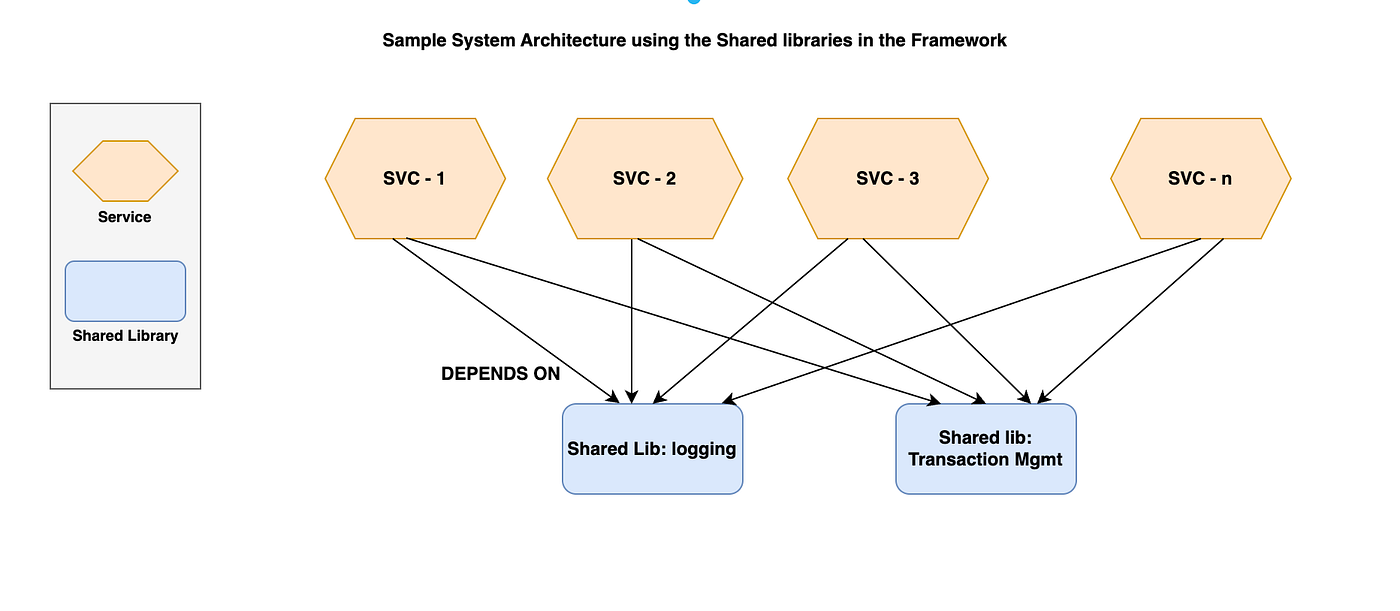
In a microservices architecture, each service is independent, but not everything should be reinvented in every service. For example, only the Auth microservice is responsible for issuing JWT tokens. However, every other service still needed to verify those tokens, protect APIs, and handle authentication errors.
The obvious solution is to add JWT middleware to each service but writing and maintaining the same middleware code in every microservice quickly becomes a bad idea. It leads to duplicated logic, inconsistent behavior, and extra effort whenever something changes.
This is where a shared library comes in.
A shared library is a reusable package that contains common logic needed across multiple services. Instead of copying code, the logic is written once, versioned, and shared. One way is to host the library as a GitHub-based npm package and use by all services like a normal dependency.
The shared library handled:
- JWT validation middleware for all protected APIs
- Centralized error handling for auth failures
- A consistent logging setup across services
This approach solves multiple problems at once. Every service enforces authentication the same way, logging looks identical everywhere, and changes are made in one place instead of many.
Most importantly, it keeps services clean and focused on business logic, while cross-cutting concerns like authentication and logging live in a single, well-defined place.
In short, a shared library is necessary when multiple services need the same behavior, and consistency, maintainability, and scalability matter more than copy-paste convenience.
Creating & Publishing the Shared Library (Step by Step)
1. Create the shared library project
mkdir auth-logger-libcd auth-logger-libnpm init -y2. Organize your code cleanly:
src/ ├─ auth/ │ └─ jwtMiddleware.ts ├─ logger/ │ └─ logger.ts └─ index.ts
3. Export everything from index.ts:
export * from "./auth/jwtMiddleware";export * from "./logger/logger";
4. Configure package.json for GitHub Packages
Update package.json:
{
  "name": "@your-github-username/auth-logger-lib",
  "version": "1.0.0",
  "main": "dist/index.js",
  "types": "dist/index.d.ts",
  "publishConfig": {
    "registry": "https://npm.pkg.github.com"
  }
}
Package name must be scoped (@username/package-name) for GitHub Packages.
5. Build the package
If using TypeScript:
npm install -D typescript
npx tsc --init
npx tsx
This generates the dist/ folder.
6. Authenticate with GitHub Packages
Create a GitHub Personal Access Token (PAT) with:
read:packages
write:packages
7. Then create .npmrc in the project root:
@your-github-username:registry=https://npm.pkg.github.com//npm.pkg.github.com/:_authToken=YOUR_GITHUB_TOKEN
8. Publish the package
npm publish --registry=npm.pkg.github.com
Your shared library is now live on GitHub Packages 🎉
10. Using the Shared Library in Other Microservices
Configure .npmrc in each microservice
In every service that consumes the library:
@your-github-username:registry=https://npm.pkg.github.com//npm.pkg.github.com/:_authToken=YOUR_GITHUB_TOKEN
11. Install the package
npm install @your-github-username/auth-logger-lib --registry=npm.pkg.github.com
12. Import and use it
Example (Express):
import { jwtMiddleware, logger } from "@your-github-username/auth-logger-lib";
app.use(logger());
app.use("/api", jwtMiddleware());
Done. No duplicated middleware. No inconsistent logging.
Table Of Contents
- Creating & Publishing the Shared Library (Step by Step)
- 1. Create the shared library project
- 4. Configure package.json for GitHub Packages
- 5. Build the package
- 6. Authenticate with GitHub Packages
- 8. Publish the package
- 10. Using the Shared Library in Other Microservices
- 11. Install the package
- 12. Import and use it